Blog

1 dk okuma

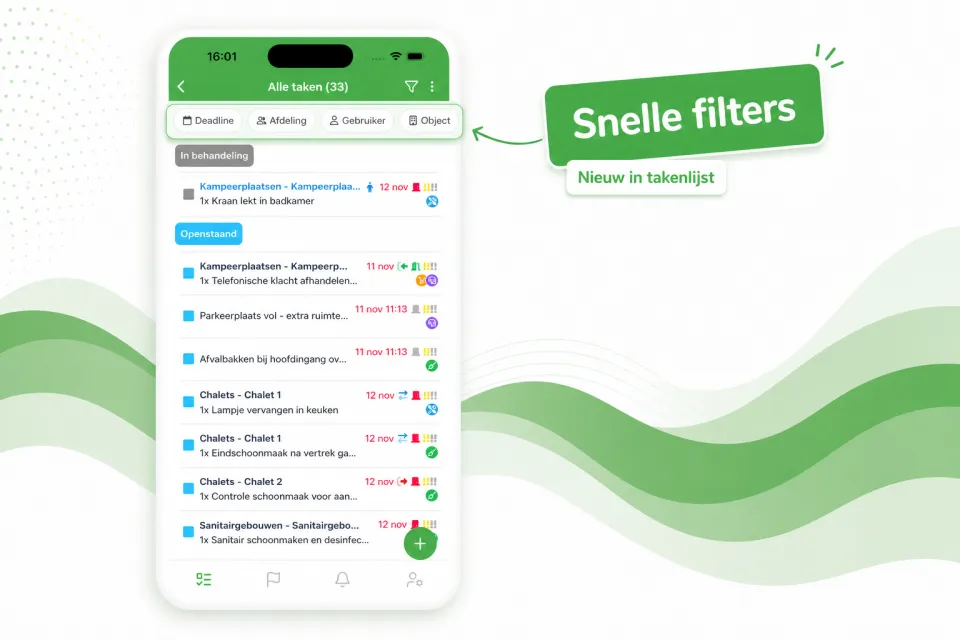
Quick filters in the task list

The task list now opens with a row of quick filters at the top — Deadline, Department, User, Object and more — so with a single tap you immediately see the right tasks, without first opening the full filter window.

The task list now opens with a row of quick filters at the top — Deadline, Department, User, Object and more — so with a single tap you immediately see the right tasks, without first opening the full filter window.

Prefer a calmer view? Using the three-dots menu at the top right of the task list, you can easily turn off the quick filters. Your preference will be remembered for next time.
İşe yaradı mı?

Makaleyi park ekibindeki iş arkadaşlarınla paylaş.

LinkedIn Facebook

Blogdan daha fazlası

Tüm makaleler

Bunu kendi parkınızda görün

Bir demo talep edin, Verbleif'i durumunuza özel olarak birlikte gözden geçirelim.