Blog

1 min de lecture

Quick filters in the task list

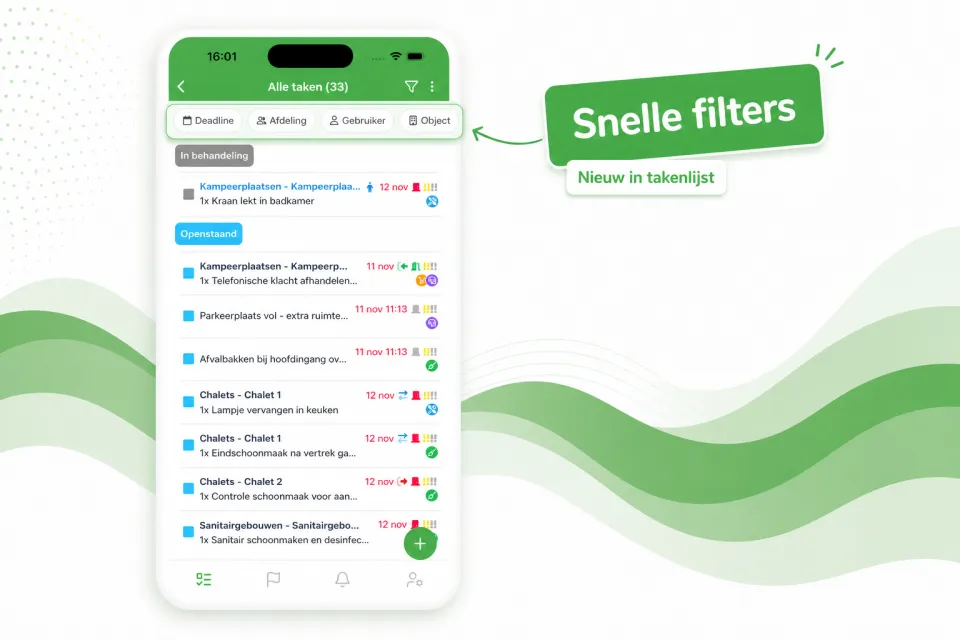
The task list now opens with a row of quick filters at the top — Deadline, Department, User, Object and more — so with a single tap you immediately see the right tasks, without first opening the full filter window.

The task list now opens with a row of quick filters at the top — Deadline, Department, User, Object and more — so with a single tap you immediately see the right tasks, without first opening the full filter window.

Prefer a calmer view? Using the three-dots menu at the top right of the task list, you can easily turn off the quick filters. Your preference will be remembered for next time.
Cet article vous a été utile ?

Partagez l'article avec vos collègues sur le parc.

LinkedIn Facebook

Plus d'articles du blog

Tous les articles

Voyez-le sur votre propre parc

Demandez une démo et nous vous présenterons Verbleif, adapté à votre situation.