Blog

1 min de lectura

Quick filters in the task list

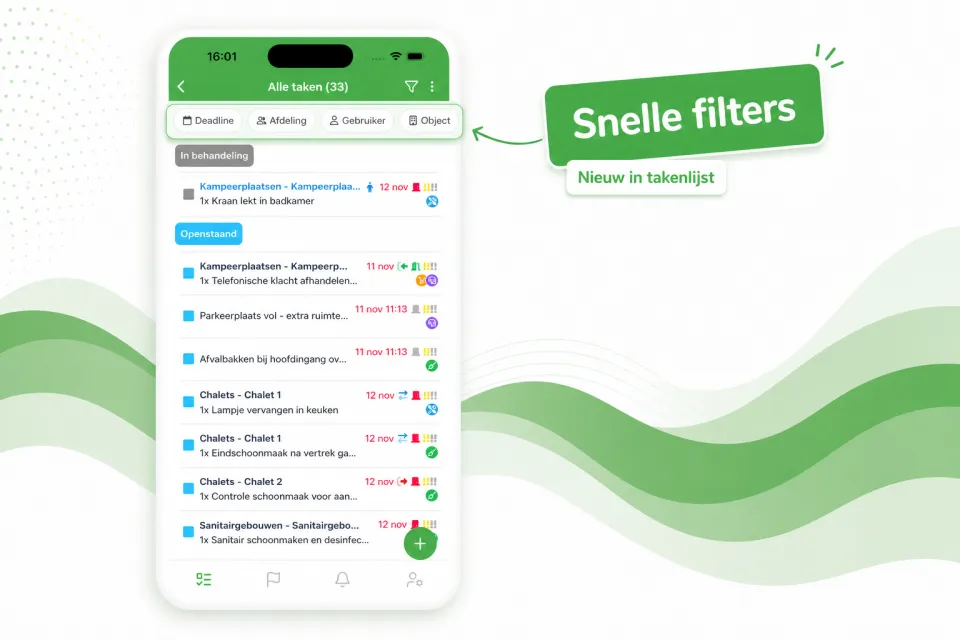
The task list now opens with a row of quick filters at the top — Deadline, Department, User, Object and more — so with a single tap you immediately see the right tasks, without first opening the full filter window.

The task list now opens with a row of quick filters at the top — Deadline, Department, User, Object and more — so with a single tap you immediately see the right tasks, without first opening the full filter window.

Prefer a calmer view? Using the three-dots menu at the top right of the task list, you can easily turn off the quick filters. Your preference will be remembered for next time.
¿Te ha servido?

Comparte el artículo con tus compañeros del parque.

Más del blog

Todos los artículos

Velo en tu propio parque

Solicita una demo y te mostramos Verbleif, adaptado a tu situación.