المدونة

قراءة 1 دقيقة

Quick filters in the task list

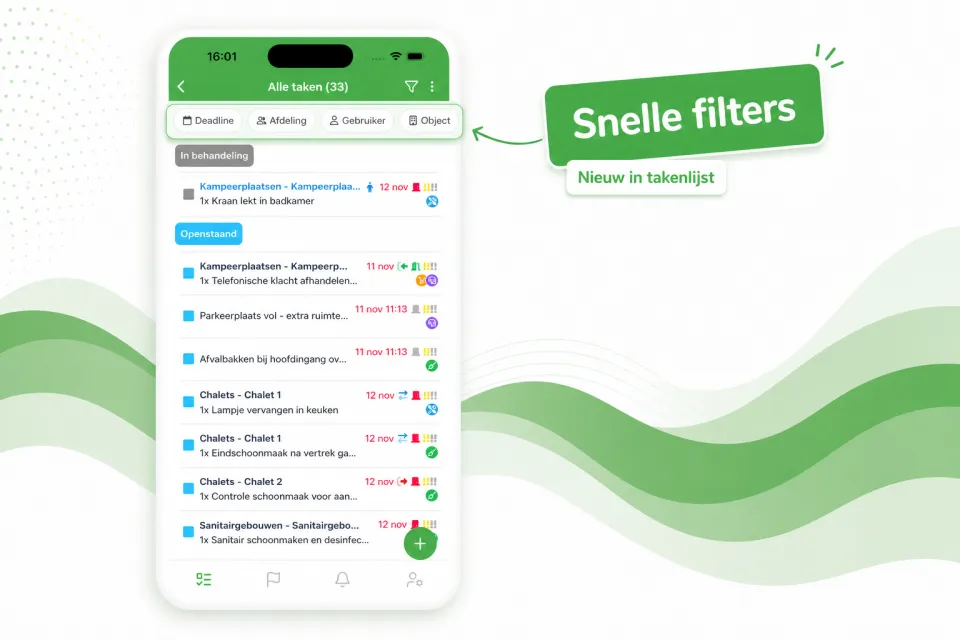
The task list now opens with a row of quick filters at the top — Deadline, Department, User, Object and more — so with a single tap you immediately see the right tasks, without first opening the full filter window.

The task list now opens with a row of quick filters at the top — Deadline, Department, User, Object and more — so with a single tap you immediately see the right tasks, without first opening the full filter window.

Prefer a calmer view? Using the three-dots menu at the top right of the task list, you can easily turn off the quick filters. Your preference will be remembered for next time.
هل أفادك هذا؟

شارك المقال مع زملائك في المنتجع.

LinkedIn Facebook

المزيد من المدونة

جميع المقالات

شاهده في منتجعك

اطلب عرضاً توضيحياً وسنستعرض Verbleif معك، مع التركيز على وضعك الخاص.